

Prerequisites
Before setting up Knowledge management in AgentOS, ensure you have:- A running vector database and contents database accessible to your application
- An embedder configured with any required API keys or credentials
- Agno installed:
uv pip install agno - Basic understanding of Knowledge concepts
Example
This example demonstrates how to attach multiple Knowledge bases to AgentOS and populate them with content from different sources.agentos_knowledge.py
Screenshots
The screenshots below show how you can access and manage your different Knowledge bases through the AgentOS interface: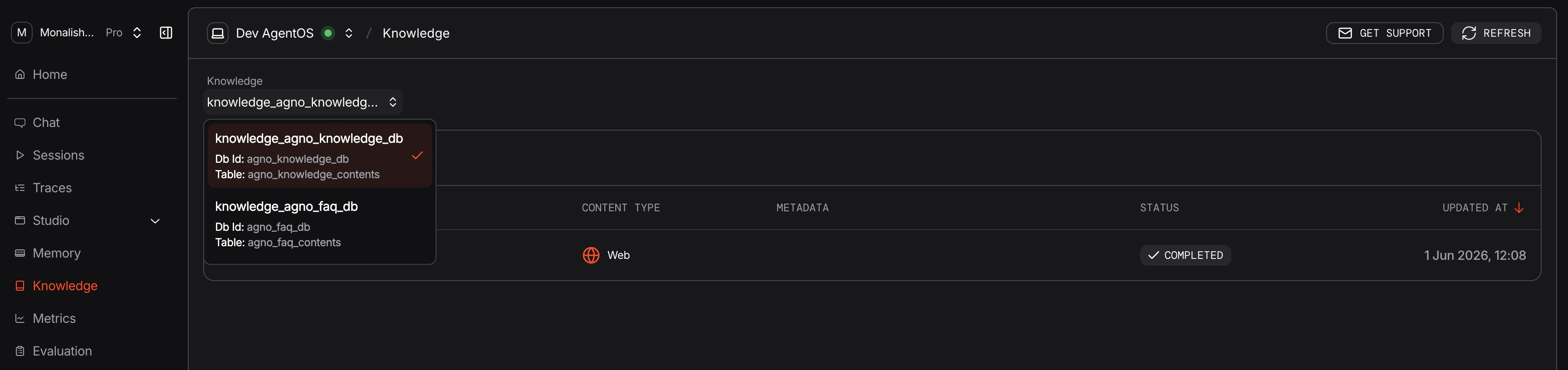
Knowledge ID
Each Knowledge instance registered with AgentOS gets a deterministicknowledge_id. It is a SHA256 hash of the instance’s name, contents-database id, and knowledge_table name, formatted as a UUID-shaped string (8-4-4-4-12 hex). The same inputs always produce the same ID, so it is stable across restarts.
Use knowledge_id in API calls to target a specific Knowledge instance:
source_params and S3 file browsing), see Remote Content.
Finding your Knowledge ID
The root/config endpoint returns the full AgentOS configuration, including a knowledge.knowledge_instances list with the ID, name, and database details for every registered Knowledge instance:
Backward compatibility
If you have a single Knowledge instance, you can omitknowledge_id from API calls. AgentOS will route to it automatically. For multiple instances, you can also use the db_id query parameter, but knowledge_id is preferred as it uniquely identifies the instance even when multiple instances share the same database.
Best Practices
- Separate Knowledge by Domain: Create separate Knowledge bases for different topics (e.g., technical docs, FAQs, policies)
- Consistent Naming: Use descriptive names for your Knowledge bases that reflect their content
- Regular Updates: Keep your Knowledge bases current by regularly adding new content and removing outdated information
- Monitor Performance: Use different table names for vector storage to avoid conflicts
- Content Organization: Use the
nameparameter when adding content to make it easily identifiable - Use metadata for filtering and searching: Add metadata to your content to make it easier to find and filter
Troubleshooting
Knowledge base not appearing in AgentOS interface
Knowledge base not appearing in AgentOS interface
Ensure your knowledge base is properly added to the
knowledge parameter when creating your AgentOS instance.
Also make sure to attach a contents_db to your Knowledge instance.Database connection errors
Database connection errors
Verify your PostgreSQL connection string and ensure the database is running and accessible.
Content not being found in searches
Content not being found in searches
Check that your content has been properly embedded by verifying entries in your vector database table.